Publications
Create records of content Publications (crm_publication) on external resources after the completion of all content development stages.
Publications
To create a publication record, complete the steps below:
- Navigate to CRM → Content Management → Publications.
- Click New and fill in the fields.
- Click Save or Save and exit to apply the changes.
You can also create a publication record from a content task.
Publication form fields
| Field | Mandatory | Description |
|---|---|---|
| Content distribution channel | N | Specify the channel for the content publication. |
| State | N | Select the current publication state. Available options:
|
| Content package | N | Specify the published content package. The content package enters the Published state when a publication is created for it. |
| Publication date | N | Specify the date of the upcoming publication. An empty field is automatically completed with the current date if the record enters the Published state. |
| Responsible | Y/N | Specify an employee who is responsible for the publication. The employee creating the record is selected automatically. You can change this value. If the Assignment group field is completed, the current field becomes non-mandatory. |
| Assignment group | N | Specify a group, responsible for the work on this publication. |
| URL | Y/N | Specify the link to the published content. When you complete this field, the system checks if there is a Content distribution channel with the same address. If such a record is not found, the search is repeated with a value shortened to the first / sign. If a matching record is found, the Content distribution channel field is automatically filled in with it. If not, then its value does not change. The value should be in the URL format: it should begin with The field becomes mandatory after the state is changed to Approved and record is saved and remains mandatory in the Published state. |
Hidden fields
Some fields are not added to the form and list interface and are read-only. You can add them to the form to view this information, or use them for filtering. All fields listed below are completed automatically with the values from the content entities of higher levels (content package, content task, content, marketing message) if the corresponding fields are completed. If the content package is not specified for a publication, none of the fields listed below is completed.
| Field | Description |
|---|---|
| Content language | The language of the published content package. |
| Target audience | The target audience of the published content package. |
| Content task | The content task from which the published content package was created. |
| Content format | The format of the content task from which the published content package was created. |
| Content | The content from which the content task was created. |
| Marketing message | The marketing message of the content. |
| Service/Product | The service or product promoted in the marketing message. |
| Pain | The customer pain at which the marketing message is aimed. |
| Differentiator | The differentiator highlighted by the marketing message. |
| Recognition ladder transition problem | The recognition ladder transition problem which the marketing message aims to solve. |
| Communication objective | The communication objective of the marketing message. |
| Recognition ladder step | The recognition ladder step to which the marketing message is dedicated. |
| Sales direction | The sales direction specified in the marketing message. |
Create publication from content task
You can also create a publication from a content task. Complete the following steps:
-
Navigate to CRM or My Work in CRM → Content Tasks and open the task you need to create a publication from.
-
Click New in the Publications related list on the task form.
-
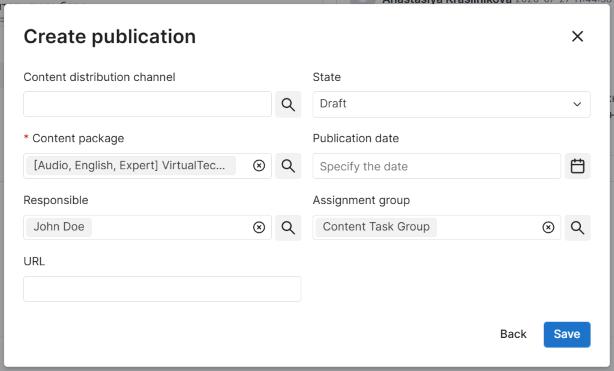
Fill in the fields of the Create publication modal window. The following fields are automatically completed with information from the content task:
- Content package. This field is automatically completed with the newest package related to the task. When editing the value, you can only select the packages related to the task.
- Responsible.
- Assignment group.
The Draft state is selected by default, but you can select another value. If you change the state to Published while the Publication date field is empty, this field will be automatically completed with the current date.
-
Click Save to apply the changes.
Content distribution channels
You can add Content Distribution Channels (crm_content_distribution_channel) to connect the content published on the external resources with the data in the system.
Roles required: any "out-of-the-box" B2B CRM role.
To create a content distribution channel, complete the steps below:
- Navigate to CRM → Content Management → Distribution Channels.
- Click New and fill in the fields.
- Click Save or Save and exit to apply the changes.
Content Distribution Channel form fields
| Field | Mandatory | Description |
|---|---|---|
| Name | Y | Add the title of the content distribution channel. |
| URL | N | Specify the URL of the content distribution channel. |
| Responsible for publications | N | Specify an employee responsible for content publications on this channel. |
| Is managed | N | Select the checkbox if the content distribution channel is under a sales direction's control. |
| Sales direction | Y/N | Specify the sales direction to which the content distribution channel is related. You can select from the sales directions that you belong to. If the Service/Product field is filled in, you can select only from the sales directions in which this service or product is specified. If the Is managed checkbox is selected, the field becomes mandatory. |
| Service/Product | N | Specify the service or product promoted in the content distribution channel. If the Sales direction field is filled in, only the services and products related to the specified sales direction are available. |
| Content language | Y/N | Specify the language of the content distribution channel. If the Is managed checkbox is selected, the field becomes mandatory. |
| Main format | Y/N | Specify the format of the content distribution channel. If the Is managed checkbox is selected, the field becomes mandatory. |
| Target audience | Y/N | Specify the target audience of the content distribution channel. If the Is managed checkbox is selected, the field becomes mandatory. |
| UTM source | N | Add a tag with the traffic source. |
| UTM medium | N | Add a tag with the traffic type. |
| UTM content | N | Add a tag with the content. |
| Description | N | Add the description of the content distribution channel. |