Announcements
Announcements are used to deliver service-related news or notifications to the users of the existing portals in different system languages. They are displayed on the portal and/or sent via email.
When displayed on the portal, the announcement list is located in the Announcements area that is shown below:
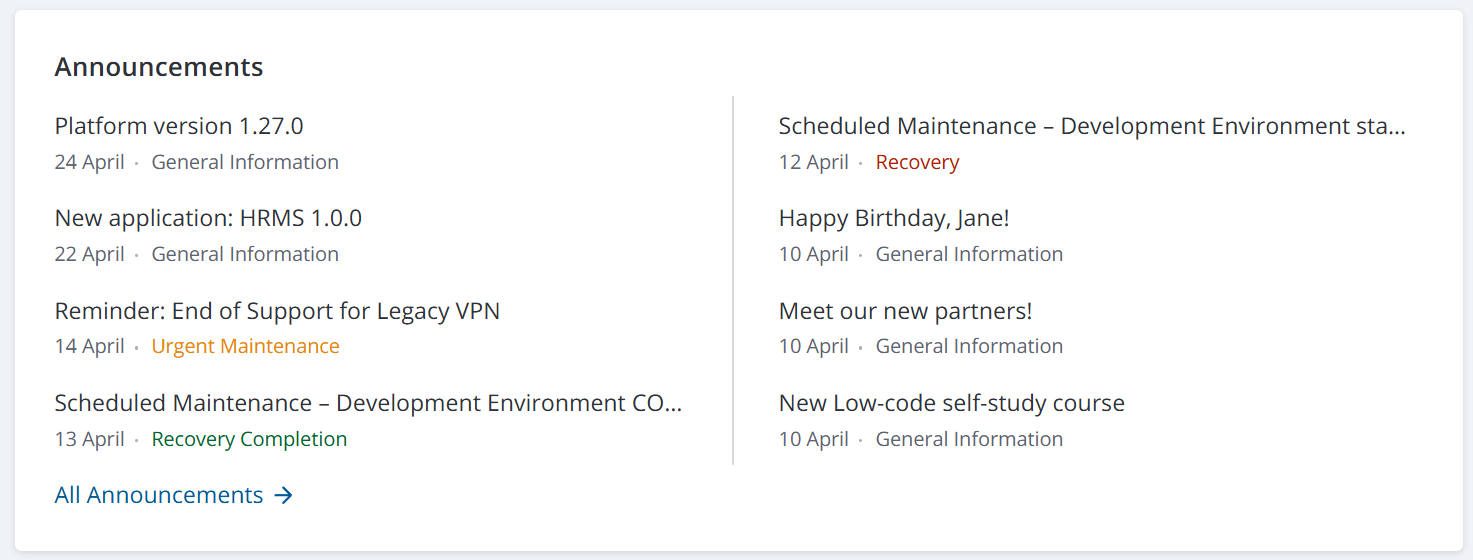
To improve delivery speed and the quality of standard announcements, you can create announcement templates and add translations. You can then create announcements from these templates, and their translations will be added to the announcement automatically. Before sending and publishing, ensure that you add the latest information to all translations and verify that all fields are filled in correctly.
Access to announcements
Users with the admin or announcement_manager role can configure the availability of announcements to users. To do so, navigate to an announcement and specify the Access criteria, as well as the Portals the announcement is to be displayed on. If these values are not provided, the announcement will be displayed to all authorized users on all the portals existing in the system.
To make it possible to share an announcement link with your partners and clients not authorized on the portals, select the Public checkboxes in relevant records:
- Announcement portal page record in the Page (page) table.
- Announcement widget instance record in the Widget Instance (sys_widget_instance) table.
If a page contains several widgets, you should allow access to all of them. Otherwise, the system will display an empty page.
As a result:
- Unauthorized users follow a link to a published announcement, they can read it without logging in.
- Unauthorized users can open other records displayed in the Last Announcements widget.
Announcement types
There are five announcement types in SimpleOne. They are used to categorize announcements based on the information they provide.
| Announcement Type | Description |
|---|---|
| Recovery | Informs that some service or CI recovery activities have been started. |
| Recovery completion | Informs that some service or CI recovery activities are over. |
| Maintenance | Informs about updates, backups, or maintenance. |
| Urgent maintenance | Informs about an unexpected breakdown. |
| General information | Shows notifications. |
You can customize the highlights of the announcement type and the view of the announcement widget on the service portal. You can also customize the announcement highlight in the agent interface. See the Style Rules article to learn more.
Localize announcements
The platform supports announcement localization for all languages registered in the Language (language) table. The language used for sending announcements and displaying them on the portal is the same and is defined by the announcement.language.source system property and the user's Interface language and Announcement language settings.
If translation records have not been created, the language of the original announcement is set as the default language. When you create translations, you can specify which one to use as the default. The announcement in this language is sent to users via email and is available on the portal if:
- The user whose email is in the recipient list does not have an account in the system.
- There is no announcement translation that matches the Interface language or Notification language specified in the user's settings.
Announcement Localization form fields
The Announcement Localization (announcement_localization) table stores all translations for announcements and announcement templates. The form fields are completed automatically from the original announcement record but you can edit them except the Original announcement field.
| Field | Mandatory | Description |
|---|---|---|
| Subject | Y | Specify the announcement title in the language selected in the Language field. |
| Language | Y | Specify the language of this translation. |
| Use by default | N | Select the checkbox to use the translation by default in the cases described here. |
| Original announcement | Y/N | A reference to the original announcement record. The field is completed automatically if the translation record is created from the announcement form. The field is unavailable if the Announcement template is specified. |
| Announcement template | Y/N | Specify the template for which the translation is created. |
| Signature | N | Specify the signature record in the selected Language. |
| Content | Y | Add the translation of the original announcement body in the Language field. |
| Order | Y | The order of the translation tab in the announcement body widget. |
Announcement feedback
You can configure adding feedback for each announcement separately. If configured, the feedback widget is displayed on an announcement's portal form. Read more in the Create Announcements article.