Service Catalog Page
You can configure access to the service catalog, as well as the access level, hierarchy, and display order of its categories on the self-service portal.
Read more about creating a service catalog in the SimpleOne platform in the Service Catalogs section.
Typically, a service catalog page includes the following configurable widgets:
A service catalog page contains:
- a breadcrumbs widget that allows users to navigate within the structure of portal pages.
- a sidemenu widget that adds a side menu.
- a category widget that contains tiles that represent catalog elements (categories and requests).
These widgets interact with each other due to the server and client logic.
The service catalog page references the dedicated portal node with the following attributes:
- The Enable dynamic nodes attribute is active.
You can also configure the following elements on this page:
- the conditions to display categories and their items
- the nesting level of the categories
- displaying order of the categories
To bind a catalog record with a portal record, make the settings in the Portal Node (portal_node) record.
The service catalog page looks as shown on the screenshot below:
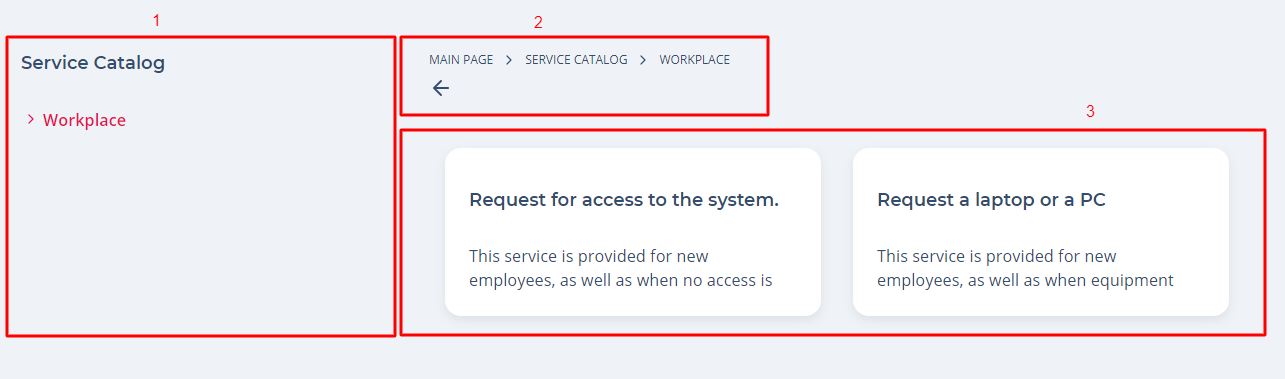
The screenshot legend:
- Side navigation menu, displaying the current category and its items
- Breadcrumbs facilitating navigation within the portal pages structure
- The category items themselves
Breadcrumbs configuration
To configure breadcrumbs, use the attribute values as in the example below. Type these values in the Template field of the <breadcrumbs> widget form:
<div class="portal__breadcrumbs">
  <breadcrumbs>
</div>
Sidemenu configuration
To configure a sidemenu widget, use the following template:
<div class="portal__side-menu__tag">
  <SideMenu
    parentsDepth="0"
    childrenDepth="5"
    includeCategories="1"
    includeItems="1"
  ></SideMenu>
</div>
Find more information about the widget configurations in the sidemenu article.
Category widget configuration for a REM service catalog
To configure the category widget for a REM service catalog, use the following template in the widget instance of REM Catalog Request List:
<div class="portal-catalog-list">
  <Category
    categorySubject="subject"
    categoryDescription="description"
    categoryIcon="image"
    itemSubject="subject"
    itemDescription="description"
    itemIcon="image"
    date="sys_created_at"
    user="sys_created_by"
  ></Category>
</div>
Read more in the category article.
Category widget configuration for a template service catalog
The Template Service Catalog is deprecated. We recommend to use a REM Service Catalog instead.
If you use a Template Service Catalog, create an instance of the Service Catalog List widget to configure the category layout. Use the example below as a template in the widget instance:
<div class="portal-catalog-list">
  <Category
    categorySubject="name"
    categoryDescription="description"
    categoryIcon="image"
    itemDescription="description"
    itemSubject="name"
    itemIcon="image"
  ></Category>
</div>