Service Specifications
In SimpleOne, the documentation for each service has a set of specifications which, in turn, are divided into external and internal specifications. The following illustration shows an example of possible articles included in a service specification, while the actual contents of the documents are determined by the customer and their needs.
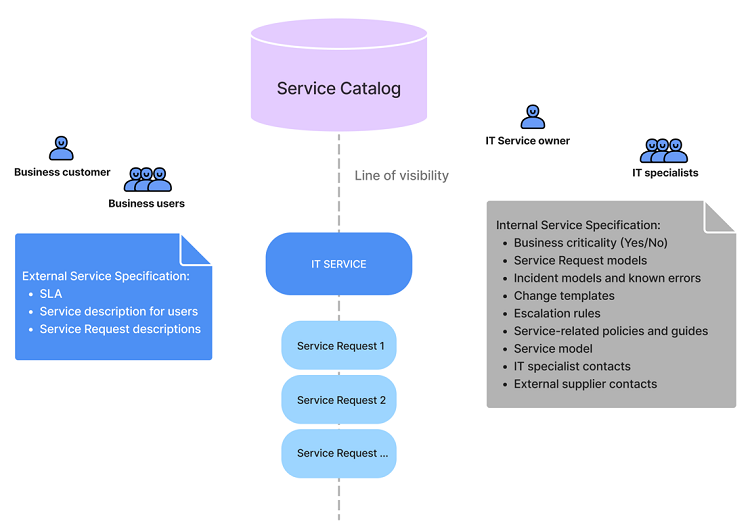
External service specifications
External service specifications are essential for the business user of the IT service and may include:
-
Service Level Agreements (SLA)
This specification is for SLM parts related to this service. It describes various aspects of service quality, such as maximum request handling time, and other.
-
Service description for users
Provide informative service descriptions related to the company infrastructure.
-
Service request descriptions
Provide service request descriptions.
A service's form displays its external specification. To view all external specifications grouped by services, navigate to Service Portfolio → Specifications → For Consumers.
See the Knowledge Base article to learn how to create the specification articles.
Internal service specifications
Internal service specifications are available to the owner of the IT service (agent) responsible for task handling and, among other documents, may include:
-
Incident models
These incident models define specific agreed tasks or steps that need to be followed to resolve these incidents or any incidents related to this category.
-
Service request models
These service request models define specific agreed tasks or steps that need to be followed to fulfill these service requests or any service requests related to this category.
-
Contacts
Contains the directory of contacts, such as of IT specialists or external suppliers.
-
Escalation rules
Contains classification of escalation rules, depending on the task type (incident, change request, service request, or other), its impact, urgency, and other factors. For more information, see the Process Incidents article.
A service's form displays its internal specification. To view all internal specifications grouped by services, navigate to Service Portfolio → Specifications → For Agents.
Create a service specification
In the SimpleOne system, external and internal service specifications are stored as records in the Article (article) table within the Knowledge Base section.
To create a service specification in an external or internal object category, the following records must already exist in your system:
- A Service in the Service Portfolio section.
- In the Knowledge Base Directory:
- A Knowledge Base category,
- A content item class.
Then, follow the steps below to create a service specification:
- Navigate to Knowledge Base → All Articles.
- Click New and fill in the fields in the new form.
- Click Save or Save and exit to apply the changes.
Read more about Article forms and instructions for filling out their fields to create an external or internal service specification in the Knowledge Base article.
Access to specifications on the request forms
You can provide users with the opportunity to view external service specifications on the request registration page in the Service Catalog section. To do so, you need:
- An extended record model for the selected service request is configured.
- The Service Specification widget is placed on the request registration page on the portal.
- The necessary external service specifications are published.
If the service for which you are filling out the new request has a parent service, its external specification is also available in the widget.