Position Slot
Create position slots to plan the number of employees recruited to a position, and the salary range for each of them.
Main information about the position slots registered in the system is stored in the Position Slot (hrm_position_slot) table.
Access to the position slot
| Operation | Role required |
|---|---|
| Read |
|
| Create |
|
| Update | hrm_manager, organizational unit managers, and their managers with access to the agent interface if the position slot is in the New, Approved, or Available state; the Hiring horizon, Job post, and Employment contract fields are available for editing only if the position slot is in the Agreed or Available state |
| Delete | hrm_admin |
Create a position slot
To create a position slot, follow one of the paths below:
| Path | Steps |
|---|---|
| Via the Position Slots list |
|
| Via the Position form |
|
Position Slot form fields
| Field | Mandatory | Description |
|---|---|---|
| Position | Y | Specify the position to which the slot is related. |
| Job post | N | Specify the job post for the position to which the slot is related. The field is available for editing after the approval of the position slot by the budget owner. |
| Planning horizon | N | Specify the planning horizon within which an employee to fill in the position slot should be hired. The field becomes available for editing as soon as the budget owner approves the position slot. |
| Employment contract | N | Specify the employment contract concluded with the new hire who has filled in the position slot. The field becomes available for editing as soon as the budget owner approves the position slot. |
| Start date | N | Specify the recruitment start date. |
| End date | N | Specify the recruitment end date. |
| Select salary type | Y | Select a salary type. Available options:
|
| Minimum net salary | N | Specify the minimum net salary. The field is available for editing if the Net option is selected in the Select salary type field. The value is calculated automatically if the Minimum gross salary is specified. |
| Maximum net salary | N | Specify the maximum net salary. The field is available for editing if the Net option is selected in the Select salary type field. The value is calculated automatically if the Maximum gross salary is specified. |
| Minimum gross salary | N | Specify the minimum gross salary. The field is available for editing if the Gross option is selected in the Select salary type field. The value is calculated automatically if the Minimum net salary is specified. |
| Maximum gross salary | N | Specify the maximum gross salary. The field is available for editing if the Gross option is selected in the Select salary type field. The value is calculated automatically if the Maximum net salary is specified. |
Related lists
Approvals – the list of approval requests that displays their states and the approvers' names.
Position slot control
You can control a position slot with the buttons on its form. To do so, navigate to Human Resource Management → Recruitment Planning → Position Slots and open the required record form.
| UI action | Description | Role required |
|---|---|---|
| Send for approval | Click to send a New position slot for approval. The employees who are budget owners (hrm_budget_owner) in the company where the position slot is available will receive corresponding approval requests. |
|
| Approve | Click to approve the position slot. | hrm_budget_owner |
| Reject | Click to reject the position slot. | hrm_budget_owner |
| Edit | Click to edit the form fields. The position slot transitions from the Rejected to the New state. Another approval is required after saving an edited position slot. |
|
| Archive | Click to archive the position slot. |
|
| Delete | Click to delete the position slot. The button is located in the burger menu in the upper-left corner of the form. | hrm_admin |
Position slot state model
The Position Slot state model is illustrated by the diagram below.
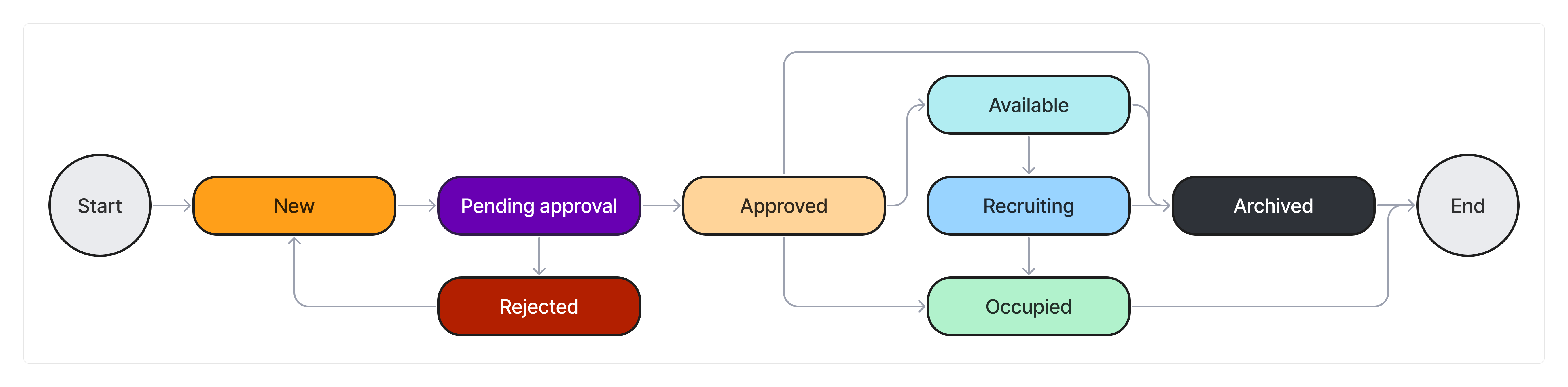
State description
| State | Description | Available operations with fields |
|---|---|---|
| New | A position slot takes this state at the first saving. Available transitions:
|
|
| Pending approval | A position slot moves into this state after clicking Send for approval on its form. Available transitions:
| Read – hrm_agent, hrm_budget_owner, managers of the organizational unit and the managers of the organizational unit one level above |
| Approved | A position slot moves into this state after clicking Approve on its form. Available transitions:
|
|
| Rejected | A position slot moves into this state after clicking Reject on its form. Rejected position slots should either be canceled or edited. Available transitions:
|
|
| Available | A position slot moves into this state after specifying the recruimtent horizon. Available transitions:
|
|
| Recruiting | A position slot moves into this state after a related vacancy is taken to work. Available transitions:
|
|
| Occupied | A position slot moves into this state after a related recruitment request is closed. Available transitions:
|
|
| Archived | A position slot moves into this final state after clicking Archive on its form. | Read – hrm_agent, hrm_budget_owner, managers of the organizational unit and the managers of the organizational unit one level above. |