Authorize Changes
Change requests of the non-standard type with Change authority not set to Local authorization must go through the authorization procedure. For standard change requests, the state changes to Scheduled automatically, without authorization.
The authorization is a request approval by change authorities of different levels, depending on the risk and probability levels. The higher the risk and probability levels are, the stricter the authorization procedure is.
Once a change request requiring authorization is registered, it goes to the authorization stage. The state of the request changes to Authorization. Approval tickets are then sent to all necessary authorities, depending on the change authority level. The tickets prompt the recipients to approve or reject the change request.
A change request is considered to be approved if both of the following conditions are met:
- all the mandatory approvers approved it;
- the optional approvers did not reject it (approved it or did not respond to their ticket).
In this case, the state of the request changes to Scheduled.
If at least one recipient rejects their approval ticket:
- all the other approval tickets are canceled automatically.
- the change request is considered to be rejected and goes back to the authorization stage.
- the state of the request changes back to Registered.
For emergency changes, due to their high importance for business services or CIs, the relationship between the Registered and Authorization states is of the one-way type. It means that emergency tickets cannot be rejected. Refer to the Change Types and State Models article to learn more.
Change authority level
This role list is specified in the calculateCAB script include delivered with your solution. This script is intended for CAB automatic generation (except for Local authorization) for all authorities.
The following table shows the dependency between the change request risk level and the authority level.
| Risk level | Change authority level |
|---|---|
| Low | Local authorization (authorization by the Assigned user) |
| Medium | Change managers only |
| High | Basic CAB (Change Advisory Board):
|
| Very high | Complex CAB (Change Advisory Board):
|
- Change manager controls the lifecycle of all changes.
- The Change Advisory Board (CAB) group advises Change managers in prioritization, authorization, and scheduling changes.
Customize a CAB
The default CAB structure is described above, but you may need to modify it according to the organizational structure or business needs. You can do it in several ways:
- Modifying a script include containing parameters responsible for CAB gathering. These modifications will affect all change requests created later.
- Adding new participants to the CAB of a specific change request while processing it.
Modify a CAB script
Role required: admin.
To bring in some global modifications into a default CAB, complete the steps below:
- Navigate to System Settings → Script Includes.
- Click the magnifier icon at the top of the list.
- Enter calculateCAB into the Name field and press Enter; the relevant script should be found.
- Click the script title to open it.
- All role sets for different CABs are defined in this script with a corresponding comment, as follows:
// Complex CAB const roles = [ 'change_manager', 'problem_manager', 'incident_manager' ];
Add or delete a role into an appropriate section to modify any CAB, basic or complex.
For example, you want request managers to participate in a complex CAB, and, at the same time, you want to relieve problem managers from these duties. Then you need to delete the problem_manager role from the script and add the request_manager role.
In the script, the stakeholders group specified in the itsm.change_request.stakeholders_group_id system property is included as optional approvers.
Modify a specific CAB
You can also modify a CAB for a specific change request with no effect on further requests. For example, if you want a particular change request to be approved by some specified employees.
- You can modify the CAB if the change request is in the Registered or Authorization state.
- For change requests in the Authorization state, when you add a user to the CAB and save the change request, an approval ticket is automatically sent to that user.
To modify a CAB, complete the steps below:
-
Navigate to the change request for which you need to modify the CAB.
-
Ensure that:
- the State is Registered or Authorization,
- the Change type is not Standard,
- the Change authority is not Local authorization.
-
Click Modify CAB on the General tab.
-
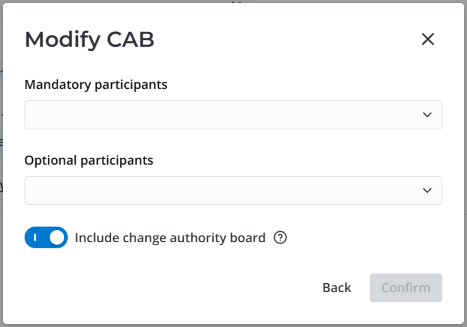
In the modal window that opens, select as many mandatory and optional participants as needed. You can select from the users who have the ITSM_agent role. You can deselect a user by clearing the checkbox next to their name.
-
(optional) Deactivate the Include change authority board toggle if you need the CAB for this request to consist only of the users you selected in the modal window. If you leave the toggle activated, the selected users will be added to the existing CAB for the current request.
The Include change authority board toggle is only available for change requests in the Registered state.
- Click Confirm.
The selected users are added into the approval process. Each of them is sent a notification they can use to open their approval ticket.
The system also creates approval records in the Approval (sys_approval) table with the approval type (Mandatory or Non-mandatory) for each participant. The reason for adding the participant is specified in the Description of each approval record, as well as in the notification.