Incident Ticket State Model
The following diagram shows the state model of incident tickets.
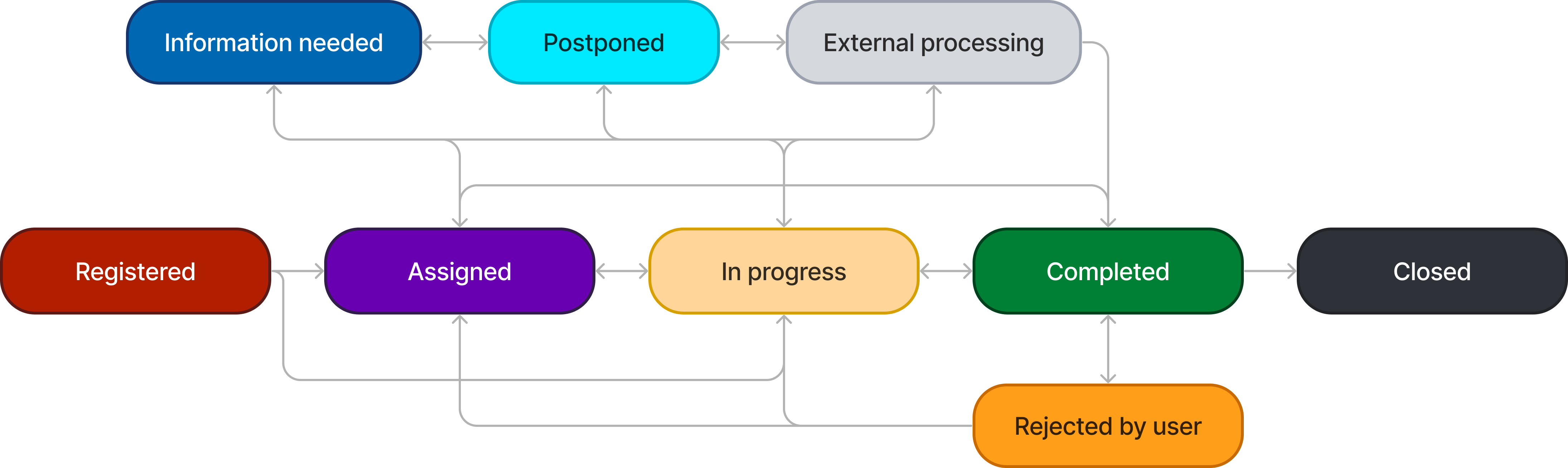
State Flow and Waiting states
The states of incident processing can be divided into:
- State Flow. When an incident is in a State Flow state, such as In progress, SLA indicators count down the time related to the incident processing until the SLA is breached.
- Waiting. When an incident is moved to a Waiting state, such as Information needed, all SLA indicators related to the incident stop the countdown.
State Flow
The State Flow group includes the following procedures and states.
| Procedure | State | Description | Available Transitions |
|---|---|---|---|
| Logging | Registered | The incident is recorded (via phone/email/Self-Service Portal) but not yet categorized. |
|
| Categorization | Assigned | The incident is categorized and assigned to a relevant person or a group. An incident moves from the Completed to Assigned state if it was resumed by the caller or their manager after its cancellation. |
|
| Diagnosis and Resolution | In progress | An agent started working on the issue. |
|
| Closure | Completed | An incident is resolved when the agent provides temporary workarounds or permanent solutions. The agent changes the state to Completed for the caller to assess the results. The caller receives a notification asking to evaluate the agent's job and the service level. If the user is satisfied with the solution, the incident is marked as Closed; otherwise, it is Rejected by user. An incident is also moved to the Completed state:
|
|
| Closure | Closed | If an incident is not closed after it was marked as Completed, it is closed automatically within an adjustable time frame. |
Only the caller has the right to close the incident ticket by accepting its solution.
Waiting
The Waiting group includes the following procedures and states.
| Procedure | State | Description | Available Transitions |
|---|---|---|---|
| Diagnosis and Resolution | Information needed | If the issue description is not clear enough, the agent can request additional information by changing the incident state to Information needed. Once the information is received, the agent should change the state to the previous one. If the caller does not respond within the specified time frame, the incident is automatically moved to the Completed state. |
|
| Diagnosis and Resolution | Postponed | The incident can be marked as Postponed if resolving the incident has to be postponed for a certain period. If the incident moves into this state, the agent must specify the date they plan to resume the work on the incident in the Resumption of work field. |
|
| Functional escalation | External processing | If resolving the incident requires involving a third party, after the reassignment, the incident state should be changed to External processing. After the third party involvement is over, the agent should change the incident state and the assigned user to the previous ones. |
|
| Resolution | Rejected by user | If the caller is not satisfied with the agent's work on the incident, they can change the state to Rejected by user to further address the defects. |
|