Known Error Database and Ratings on the Portal
The Known Error Database (KEDB) is available on the Self-Service Portal.
Known error portal access
When planning access to known errors, keep in mind that not all of them are meant to be published on the portal. The service provider should determine which known errors to make available to the service consumers, and which to leave as exclusively internal references for agents to consult.
By default, the portal KEDB contains known errors in the Outstanding state. The known errors are grouped by their KB categories, but users with the admin role can configure the display criteria. Complete the following steps:
-
Navigate to Portal Structure → Portal Nodes.
-
Open the Known errors portal node. You can use the search or follow the link
{your instance URL/record/portal_node/176422612916711520}. -
In the Category item condition field, add the necessary criteria.
Example: Display only external known errorsTo display only the known errors of the External category, available to all logged-in portal users, add the following criterion: KB Category / Object Category is External. When adding the field for the criterion, select Object Category via dot-walking by clicking the icon next to the KB Category option.
Note that the default Known Error category is Internal, but you can create external categories and specify them in the known errors you want to display on the portal per the above-mentioned configuration.
-
Click Save or Save and exit to apply the changes.
Known error portal view
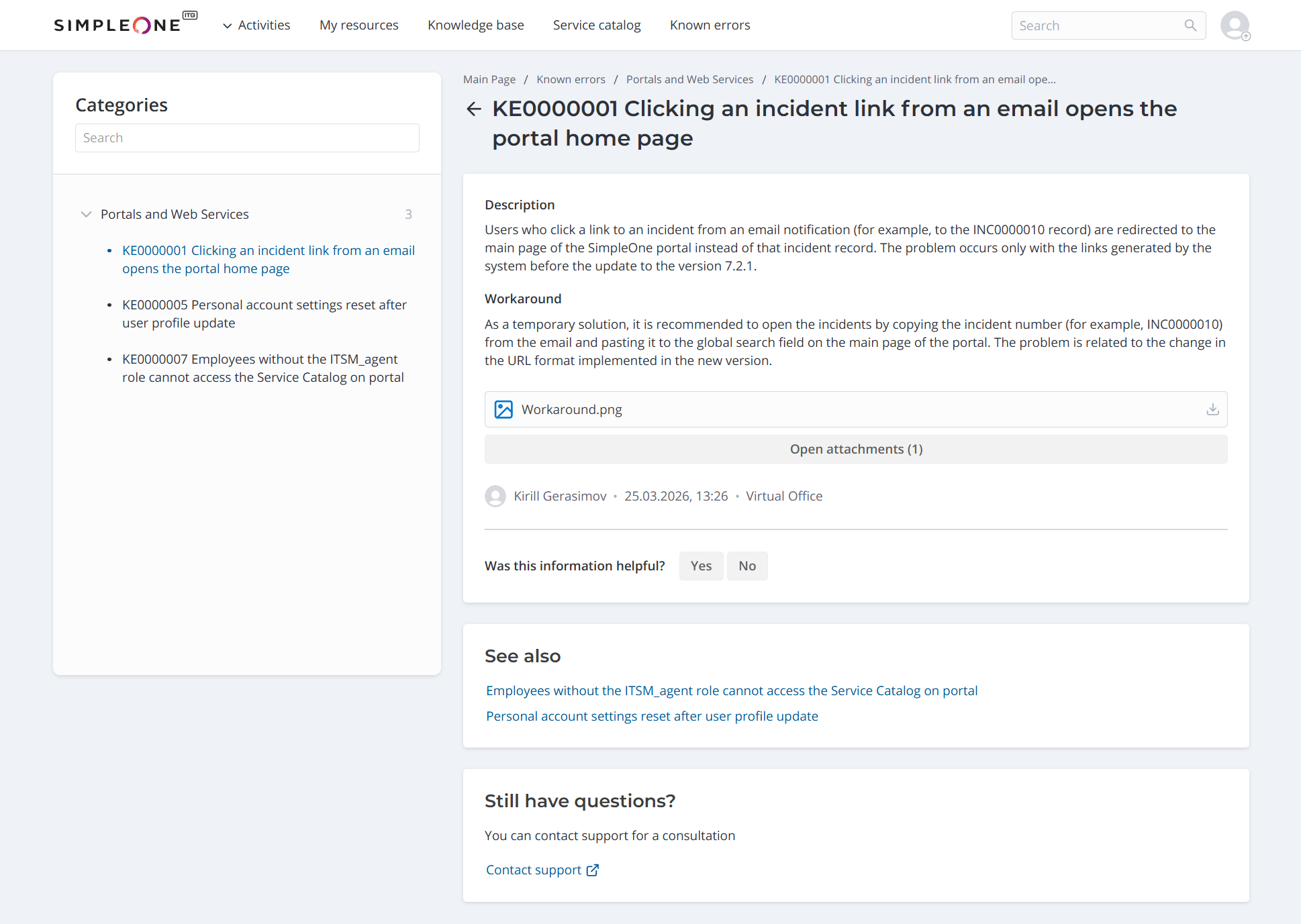
A known error's portal view contains the following information from its agent interface record:
- Description,
- Workaround,
- Created by,
- Updated at,
- Service,
- attachments (if available).
The known error portal view also displays the known errors with the same Service if there are any. The See also widget includes up to five known errors in the Outstanding state, sorted by the Created at date in descending order.
If the workaround did not help, users can submit a query to the service desk by clicking Contact support in the Still have questions? widget. In this case, the Known error field of the user query is automatically filled in with the known error from the portal view of which it was created.
Known error ratings
Portal users can rate how helpful the known error information is to them. If they leave a negative rating, they are prompted to provide feedback on how the information can be improved.
A known error's rating is determined based on how users respond to the Was this information helpful? question on its portal view:
- Replying Yes increases the rating by one point.
- Replying No decreases the rating by one point.
The Known Error Rating (itsm_known_error_rating) table contains all the known error ratings. It is available only for viewing to users with the admin, knowledge_admin, or ITSM_agent role.
Known Error Rating form fields
| Field | Mandatory | Description |
|---|---|---|
| Known error | Y | The reference to the rated known error. |
| Known error.Service | N | The reference to the service the known error pertains to. |
| Information was helpful | N | A checkbox whose state corresponds to the user's reply to the Was this information helpful? question. |
| User | Y | The reference to the user who provided the rating. |
| Feedback | N | The comment the user left when providing a negative rating. If the user changes their rating to the positive one, the field is cleared. |
A known error's aggregate Rating is also displayed on its record form in the Known Error (itsm_known_error) table. In addition, the form contains the Known Error Ratings related list with the ratings and feedback left for this known error by users.