Known Errors
A known error is a problem that has been analyzed and whose cause is known but whose solution has not been found yet. Applying workarounds helps lessen the impact of these problems until they are fully resolved.
You can view known errors and their workarounds in the Known Error Database (KEDB). To do so, complete the following steps:
- Click Known Errors in the portal header or the navigation cards area.
- Open the applicable known error category.
- Click the known error name.
You can also find the category or known error you need using the search bar.
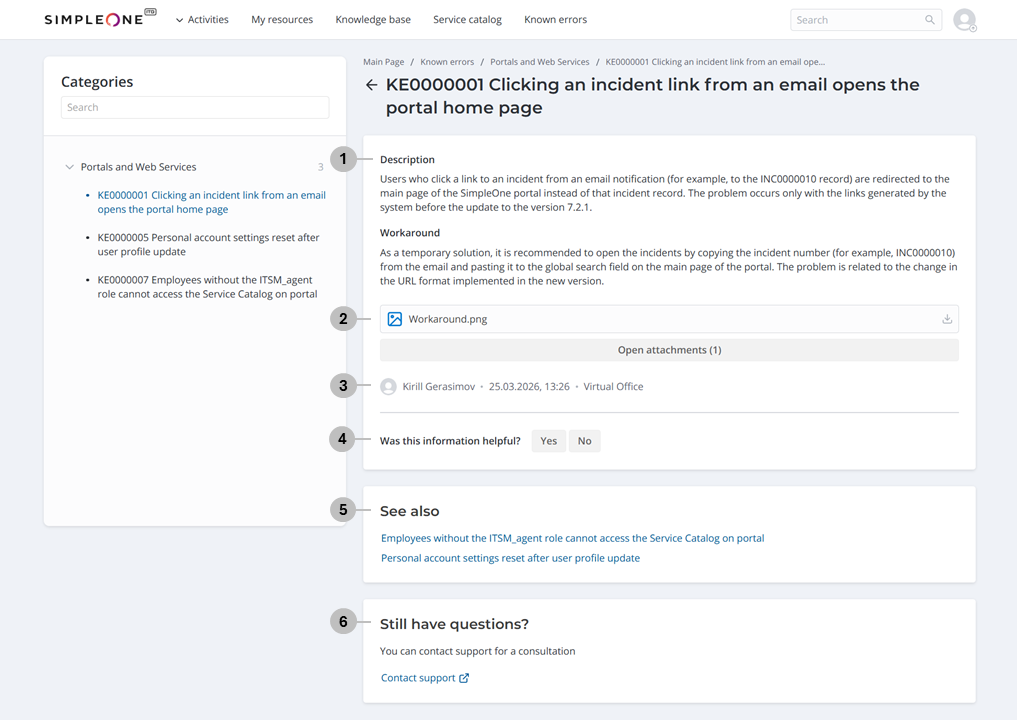
Known error page
On the known error page, you can:
- View its Description and Workaround.
- Open the attachments if there are any.
- View its author and when it was last updated, as well as the service it pertains to.
- Rate how helpful the provided information is. If you indicate that the information was not helpful, you can leave your feedback on how it can be improved. You can change your rating by selecting the other rating option.
- View other known errors impacting this service if there are any.
- Submit a query to the service desk if the workaround did not help.