Timecards
The Timecard (wtm_timecard) table stores the information about the time spent on specific activities during the week.
You cannot create or edit records of this table from its list or form views. To create a new timecard or modify an existing one, use the timesheet.
The users with the admin or wtm_admin role can view all records of this table and delete them. When a timecard is deleted, all related time entry records are also deleted.
View timecards
Employees can view only their timecards. Managers can view their timecards, as well as their subordinate employees' timecards.
- To view your own timecards, navigate to Time Entry Management → My Timecards.
- To view your subordinate employees' timecards, navigate to Time Entry Management → Subordinates Timecards.
When you open any record, the form has the following view:
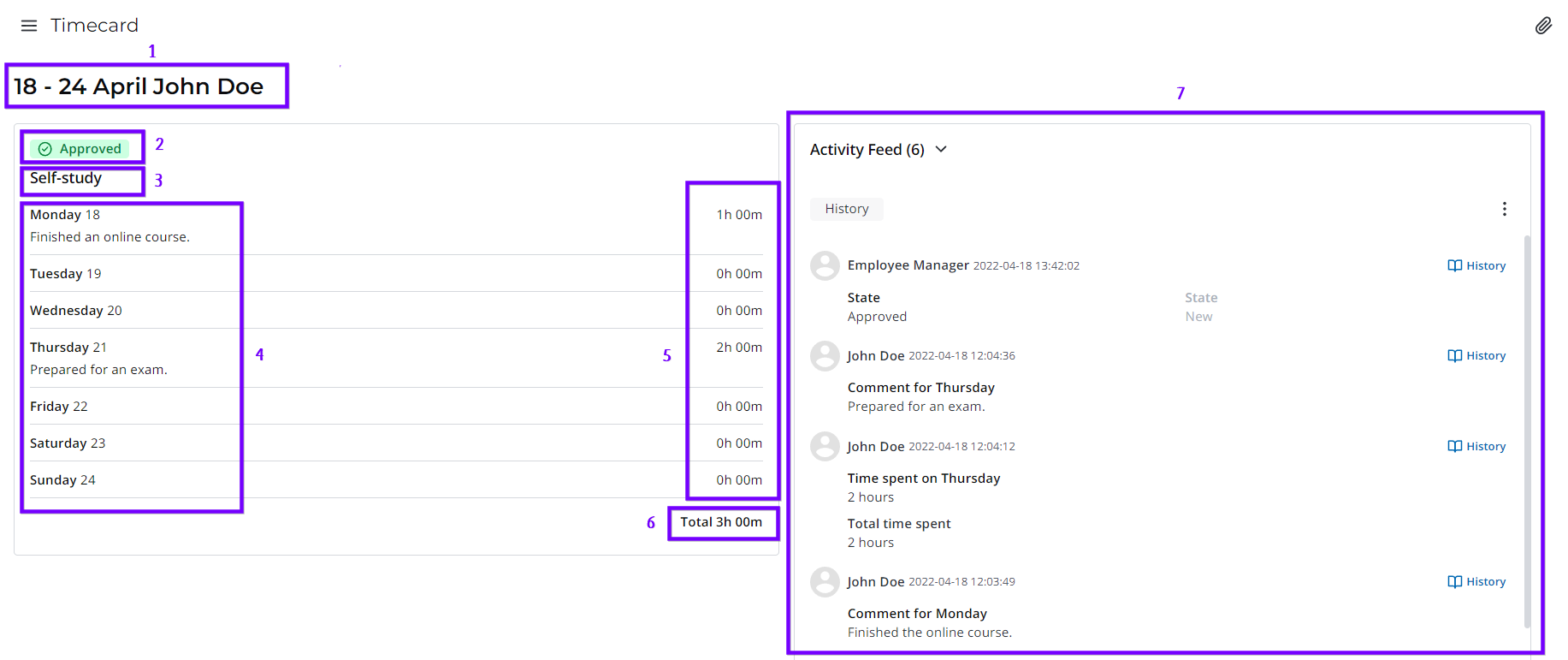
- Date range of the week and the Display Name of the employee who created the timecard.
- State of the timecard.
- Activity type or name of the task and a link to the task record.
- Date and days of the week with comments, if any.
- Time spent on the activity for each day of the week.
- Total time spent on the activity.
- The Activity Feed that shows the history of field changes.
As a manager, you can also approve or reject a timecard from its form. Read more in Subordinates' timesheet.
Regular timecards
Regular timecards are automatically added to the timesheet with the specified frequency.
Create regular timecards
You can create a regular timecard or make an existing timecard regular via your timesheet.
You can also create regular timecards via the Regular Timecard (wtm_regular_timecard) table. To do so:
- Navigate to Regular Timecards → All Regular Timecards.
- Click New in the upper-left corner.
- Fill in the form fields.
Roles required:
- Create, read – all users with access to the agent interface.
- Update – admin, wtm_admin; user with any role if they created the record.
- Delete – admin, wtm_admin.
Regular Timecard form fields
| Field | Mandatory | Description |
|---|---|---|
| Activity | Y | Specify the activity the timecard pertains to. |
| Activity type | N | Specify the activity type the timecard pertains to. The field appears if the Activity is set to any option except Task. |
| Task | Y | Specify the task the timecard pertains to. The field appears if the Activity is set to Task. In this case, the Activity type field is not displayed. |
| Description | N | Add a description for the timecard. |
| Frequency | Y | Specify the frequency with which the timecard is to be added to the timesheet. Available options:
|
| Days of week | Y | Specify the days on which the timecard is to be added. These days must be working days according to your schedule. The field appears if the Frequency is set to Weekly or Once per specified number of weeks. |
| Number of weeks | Y | Specify the number of weeks during which the timecard is to be added. The field appears if the Frequency is set to Once per specified number of weeks. |
| Start date | Y | Specify the date to start adding the timecard to the timesheet. The Start date cannot be earlier than the current date. By default, the field is populated with the current date. |
| No end date | N | Select the checkbox for the timecard to be added indefinitely. In this case, the End date field will be hidden. |
| End date | Y | Specify the date to stop adding the timecard to the timesheet. By default, the field is populated with the date that is one year later than the current date. If the No end date checkbox is selected, the field is hidden from the form. |
| Active | N | Select the checkbox for the timecard to be added to the timesheet. Deactivating a regular timecard also deactivates all the related Employees' Regular Timecards (wtm_m2m_regular_timecard_employee) records. You can also deactivate a regular timecard via the timesheet by selecting Cancel recurrence in its menu. |
Link regular timecards to timesheets
After you create a regular timecard via the Regular Timecard (wtm_regular_timecard) table, it needs to be linked to your timesheet for it to appear there. This link is established via the Employees' Regular Timecards (wtm_m2m_regular_timecard_employee) M2M table.
Creating a regular timecard via the Regular Timecard (wtm_regular_timecard) table triggers a message that contains a link to create a record in the Employees' Regular Timecards (wtm_m2m_regular_timecard_employee) table. In this case, the record's Regular timecard field is automatically completed with the created regular timecard. You are also specified as the Employee for whom the regular timecard is added.
You can also create a record in the Employees' Regular Timecards (wtm_m2m_regular_timecard_employee) table by navigating to Regular Timecards → Timecards Used by Me and clicking New. In this case, you are specified as the Employee for whom the timecard is added.
Roles required:
- Create – all users with access to the agent interface.
- Read – admin, wtm_admin; user with any role if they are specified in the Employee field of the record or they created the regular timecard specified in the record.
- Update – admin, wtm_admin; user with any role if they are specified in the Employee field of the record or created the record.
- Delete – admin, wtm_admin.
Employees' Regular Timecards form fields
| Field | Mandatory | Description |
|---|---|---|
| Employee | Y | The employee to whose timesheet the regular timecard is to be added. Users with the admin or wtm_admin role can specify any employee, while other users can only specify themselves. After the record is created, this field becomes read-only. |
| Regular timecard | Y | Specify a regular timecard to be added to the timesheet. After the record is created, this field becomes read-only. |
| Time spent | N | Specify the time spent on the timecard's activity. Any value updates will apply to all the timecards created on the basis of the regular timecard starting from the week following the current date. The timecards that cannot be changed are not updated. |
| General comment | N | Add a comment for the regular timecard. It will be displayed in the timesheet. |
| Active | N | Select the checkbox to add the regular timecard to the timesheet. The checkbox will be automatically cleared if the related regular timecard is deactivated. If the regular timecard is then reactivated, for it be added to the timesheet, you need to manually reactivate the corresponding Employees' Regular Timecards (wtm_m2m_regular_timecard_employee) record. |
On the list view of the Employees' Regular Timecards (wtm_m2m_regular_timecard_employee) table, you can also view the Start date, End date, and Frequency of the specified regular timecards.
If you created a regular timecard, you can access the Employees related list on its form. The list displays the employees the regular timecard is linked to. The list does not display inactive Employees' Regular Timecards (wtm_m2m_regular_timecard_employee) records.